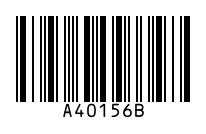
To make a Codabar barcode, type your number with a start and stop letter (A, B, C or D), for example A40156B, and download PNG, SVG or PDF. Codabar encodes digits and the symbols - $ : / . + and is still used by libraries, blood banks and older parcel and lab systems.
How to use it
- Type the value with a start letter and a stop letter, e.g. A12345B.
- Adjust size and bar height.
- Download as PNG, SVG or PDF.
Key facts
| Characters | Digits 0–9 and - $ : / . + |
|---|---|
| Start/stop | A, B, C or D |
| Check digit | None required |
| Used for | Libraries, blood banks, photo labs, older logistics |
| Also called | NW-7, Code 2 of 7, USD-4 |
Questions
Which start and stop letters should I use?
Use the ones your system expects. Many libraries use A…B; if you do not know, ask the software vendor or scan an existing label.
Should I use Codabar for a new project?
Only if an existing system needs it. For new projects Code 128 is more compact and supports letters.
Guides
- How to Get a Barcode for Your Product
- EAN vs UPC: What Is the Difference?
- Barcode Size Guide for Printing
- Amazon Barcodes: FNSKU vs UPC
Other barcode generators
- EAN-13 Barcode Generator
- UPC Barcode Generator (UPC-A)
- Code 128 Barcode Generator
- EAN-8 Barcode Generator
- UPC-E Barcode Generator
- Code 39 Barcode Generator
- ITF-14 Barcode Generator
- ISBN Barcode Generator
- GS1-128 Barcode Generator
- Data Matrix Generator
- PDF417 Barcode Generator
- Bulk Barcode Generator (ZIP & label sheets)
- Check Digit Calculator
Updated: