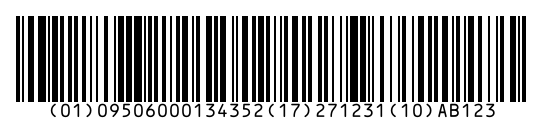
To make a GS1-128 barcode, write each Application Identifier in brackets followed by its data, for example (01) for the GTIN, (17) for the expiry date and (10) for the batch, then download PNG, SVG or PDF. GS1-128 is used on pallet and carton labels to share product data across the supply chain.
How to use it
- Write your data with Application Identifiers in brackets, e.g. (01)09506000134352(17)271231(10)AB123.
- BarcodePal checks the format of each AI and adds the FNC1 characters for you.
- Download as SVG or PDF for your logistics labels.
Key facts
| Symbol | Code 128 with FNC1 and GS1 Application Identifiers |
|---|---|
| Common AIs | (00) SSCC, (01) GTIN, (10) batch/lot, (17) expiry date, (21) serial, (3103) net weight kg |
| Date format | YYMMDD |
| Check | Each AI is validated (length, characters, GTIN check digit) |
| Used for | Pallet labels, carton labels, healthcare, food traceability |
| Also called | UCC-128, EAN-128 |
Questions
What is an Application Identifier?
A short number in brackets that says what the data after it means. (01) means GTIN, (17) expiry date, (10) batch number. Scanners and warehouse systems use them to read each field.
Do I type the brackets?
Yes, type them in the input. They are not encoded in the bars; they only show which AI starts where, and they are printed in the text under the barcode.
Why does it say my GTIN is wrong?
The 14-digit GTIN after (01) must have a correct check digit. Use the Check Digit Calculator to find it, and pad shorter GTINs with zeros on the left.
Guides
- How to Get a Barcode for Your Product
- EAN vs UPC: What Is the Difference?
- Barcode Size Guide for Printing
- Amazon Barcodes: FNSKU vs UPC
Other barcode generators
- EAN-13 Barcode Generator
- UPC Barcode Generator (UPC-A)
- Code 128 Barcode Generator
- EAN-8 Barcode Generator
- UPC-E Barcode Generator
- Code 39 Barcode Generator
- ITF-14 Barcode Generator
- ISBN Barcode Generator
- Data Matrix Generator
- PDF417 Barcode Generator
- Codabar Barcode Generator
- Bulk Barcode Generator (ZIP & label sheets)
- Check Digit Calculator
Updated: