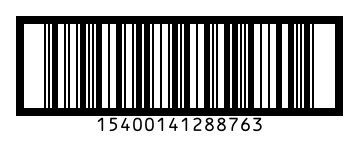
To make an ITF-14 barcode, type the first 13 digits of your GTIN-14 and BarcodePal adds the 14th check digit, then download PNG, SVG or PDF with bearer bars. ITF-14 is used on outer cartons and cases in warehouses and distribution, because it prints well directly on corrugated cardboard.
How to use it
- Type 13 digits (packaging indicator + the GTIN-13 without its check digit), or all 14.
- Keep a good bar height: carton barcodes are usually printed large.
- Download as SVG or PDF for carton printing.
Key facts
| Characters | Digits only (0–9) |
|---|---|
| Length | 14 digits: packaging indicator + 12 digits + check digit |
| Check digit | Modulo 10, calculated automatically |
| Bearer bars | Frame around the bars that protects the scan when printing on cardboard |
| Used for | Outer cartons, cases and trade units in logistics |
| Also called | GTIN-14, Interleaved 2 of 5 (ITF) |
Questions
How do I build a GTIN-14 from my EAN-13?
Put a packaging indicator digit (1–8) in front of the 12 first digits of your EAN-13 and let BarcodePal calculate the new check digit. For example, a case of 12 might use indicator 1. Check the rules with your GS1 office.
What are the bearer bars for?
They are the thick frame around the barcode. They stop a scanner from reading half the code when the printing plate presses unevenly on cardboard.
Can I use ITF-14 on a retail product?
No. ITF-14 is for cartons that do not go through a shop checkout. Retail items use EAN-13 or UPC-A.
Guides
- How to Get a Barcode for Your Product
- EAN vs UPC: What Is the Difference?
- Barcode Size Guide for Printing
- Amazon Barcodes: FNSKU vs UPC
Other barcode generators
- EAN-13 Barcode Generator
- UPC Barcode Generator (UPC-A)
- Code 128 Barcode Generator
- EAN-8 Barcode Generator
- UPC-E Barcode Generator
- Code 39 Barcode Generator
- ISBN Barcode Generator
- GS1-128 Barcode Generator
- Data Matrix Generator
- PDF417 Barcode Generator
- Codabar Barcode Generator
- Bulk Barcode Generator (ZIP & label sheets)
- Check Digit Calculator
Updated: