To make an ISSN barcode, type your 8-character ISSN and, if you want, a space and the 2-digit issue number. BarcodePal checks the ISSN, converts it to an EAN-13 starting with 977, adds the issue add-on and lets you download the barcode as SVG, PDF or PNG for your cover.
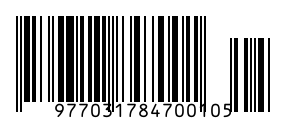

How to use it
- Type the ISSN, for example 0317-8471. Its last character is checked for you.
- Optional: add a space and the 2-digit issue number (01 for the first issue, 52 for week 52…).
- Download SVG or PDF for your cover file.
Key facts
| Symbol | EAN-13 starting with 977 + optional EAN-2 add-on |
|---|---|
| Structure | 977 + first 7 ISSN digits + 2-digit variant (00) + check digit |
| ISSN check | Modulo 11 (last character can be X); it is not used in the EAN |
| Add-on | 2 digits: issue number, week or month |
| Used for | Magazines, journals, newspapers and other serial publications |
Questions
Where do I get an ISSN?
From the ISSN national centre of your country (listed on the ISSN International Centre website). It is often free. BarcodePal only makes the barcode.
What is the 2-digit add-on?
A small extra barcode on the right that shows the issue number, so shops and distributors can tell issues apart. Many magazine distributors require it.
Why does the barcode start with 977?
977 is the EAN prefix reserved for serial publications (ISSN), like 978 and 979 are for books (ISBN).
Some distributors use a different price/variant code. Can I change the 00?
This generator uses 00, the most common variant code. If your distributor gave you a different full 13-digit number, use the EAN-13 generator with that number and add the issue after a space.
Guides
- How to Get a Barcode for Your Product
- EAN vs UPC: What Is the Difference?
- Barcode Size Guide for Printing
- Amazon Barcodes: FNSKU vs UPC
Other barcode generators
- EAN-13 Barcode Generator
- UPC Barcode Generator (UPC-A)
- Code 128 Barcode Generator
- EAN-8 Barcode Generator
- UPC-E Barcode Generator
- Code 39 Barcode Generator
- ITF-14 Barcode Generator
- ISBN Barcode Generator
- GS1-128 Barcode Generator
- SSCC Barcode Generator
- Data Matrix (DMC) Code Generator
- PDF417 Barcode Generator
- Codabar Barcode Generator
- Bulk Barcode Generator (ZIP & label sheets)
- Check Digit Calculator
Updated: